Tell a story from a photo
Upload one picture and add any context you know. Generations Spoken can help create a story from the moment—no names, dates, or documents required.
Start with a photoFamily stories, brought forward
Turn family records, documents, memories, or even a single photo into short spoken stories your family can listen to, watch, keep, and share.
Whether you start with a picture, a few family details, or years of research, Generations Spoken helps turn what you have into stories your family can experience, remember, and pass on.
Start with a photo, a few details, family records, or choose someone from your FamilySearch tree—or enter a .
Free to use. Supported by optional tips.
You choose what to upload, what to keep, and what to share. Photo stories do not require identifying anyone by name.
Pick the starting point that fits what you have today—no genealogy research required.
Upload one picture and add any context you know. Generations Spoken can help create a story from the moment—no names, dates, or documents required.
Start with a photoUpload records, documents, notes, screenshots, names, dates, or memories to help shape a more detailed family story.
Upload materialsAlready use FamilySearch? Choose someone from your relatives in the tree, or enter a , and use available names, relationships, dates, places, and memories to help create the story.
Use FamilySearchA simple way to make family stories easier to experience, whether you have only a few details or a full archive.
Some stories do not start with a full family history file. Sometimes they start with one photo, one memory, or one small moment worth preserving.
Add context like who is in the picture, where it was taken, what was happening, or why it matters. If you do not know those details, you can still begin.
Even a few names, dates, places, and records can become the start of something more personal and memorable.
When you have a large amount of family material, Generations Spoken helps pull out meaningful moments without requiring hours of reading.
Create something children, grandchildren, and relatives can listen to, revisit, and pass along.
About
Generations Spoken was built to help families do more than store information. It helps them experience it.
Sometimes that means starting with only a few details—names, dates, places, and records—or a single family photo turned into something your relatives can listen to and remember.
Other times it means taking a large collection of family materials, documents, or biographies and making the most meaningful stories easier to discover, hear, and share.
Whether you are preserving a loved one’s legacy, exploring where you come from, or making years of research easier for others to enjoy, Generations Spoken helps move family information from archives into connection.
What starts as a few details—or a full archive—can become something your family can actually hear and remember.
How it works
You do not need perfect records or a complicated setup. Start with what you have.
Upload a photo, family record, document, memory, or screenshot—or with FamilySearch, choose someone from your tree or enter a .
Create an Audio Story, video story, or another supported format.
Review the story, keep it in your library, and share it with family when you are ready.
Choose the walkthrough that fits how you like to work—on your phone or computer.
See how to add family materials, choose Audio Story or video, and create a story from a mobile browser.
See how the process looks in a desktop browser, from upload to a finished story.
See how a single picture can become a short spoken story with just a little added context.
Coming soon
Coming soon
Coming soon
Coming soon
Start with a photo, a family memory, uploaded materials, or choose someone from FamilySearch—or enter a —and turn it into something your family can listen to, watch, and remember.
Create your first storyFree to use and supported by optional tips.
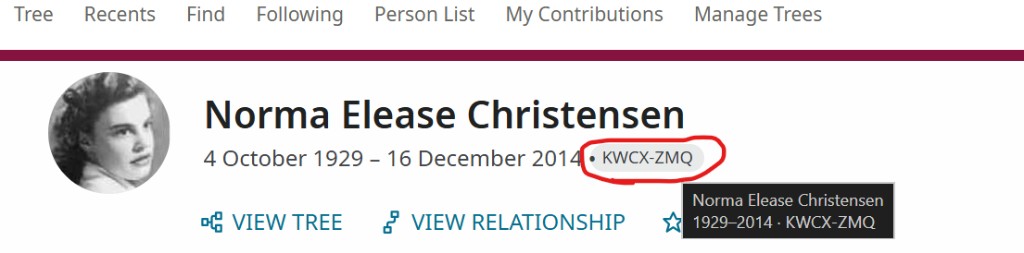 Find the ID on the profile page, next to the person’s dates.