Start from someone in your FamilySearch tree
Instead of uploading documents first, choose someone from your relatives in the tree—or enter a —and begin from information already available there.
FamilySearch Compatible Solution
Start with someone already in your FamilySearch tree—choose from your relatives, or enter their . Generations Spoken can use available names, relationships, dates, places, and memories to help create an Audio Story or video story—without requiring you to upload documents first.
Free to use. Supported by optional tips. FamilySearch linking is optional until you choose to connect.
How it works
A calm, straightforward path from someone in your FamilySearch tree to a story your family can experience—choose from your relatives or enter their ID.
Use your FamilySearch account or sign in to Generations Spoken and connect FamilySearch from your profile.
After you connect, Generations Spoken can show relatives from your Family Tree to pick from. Prefer someone else? Enter their instead.
The is the short code shown on a person’s profile (format XXXX-XXX).
Generations Spoken uses available family history details to help shape a story your family can listen to, watch, and share.
FamilySearch can make story creation faster when you already have names, relationships, and memories in your tree—choose someone from the list or enter their ID.
Instead of uploading documents first, choose someone from your relatives in the tree—or enter a —and begin from information already available there.
Names, dates, places, relationships, and memories can help shape the story.
Turn family history information into an Audio Story or video experience relatives can actually hear and remember.
You stay in control at each step—nothing is published unless you choose to.
Pick from your relatives in Family Tree, or enter a .
Your choices
Connecting FamilySearch does not publish anything for you. Finished stories stay in your Generations Spoken library unless you choose to share them. Uploading a finished Audio Story back to FamilySearch Memories is optional.
Generations Spoken is a FamilySearch Compatible Solution and is not owned or operated by FamilySearch.
Video tutorial
Watch how to connect FamilySearch, choose someone from your tree, or enter a person’s .
Tutorial video coming soon
We are preparing a step-by-step walkthrough. You can get started now while the video is on the way.
Get startedUse Help on this page or email us—we are happy to help you get started.
Click Help at the bottom-right—the same support chat as inside the app.
Reach us at info@generationsspoken.com.
Connect your account, choose someone from your tree or enter their , and create a spoken story your family can listen to, watch, and remember.
Get started with FamilySearchFree to use. Supported by optional tips. FamilySearch linking is optional until you choose to connect.
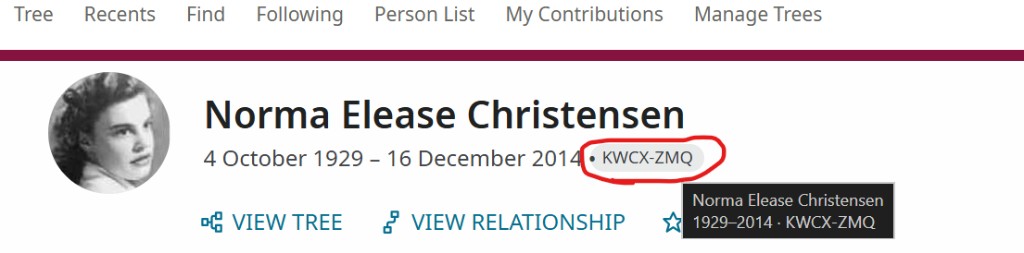 Find the ID on the profile page, next to the person’s dates.